Most teams notice lead routing only when a lead lands in the wrong inbox or sits unclaimed for a day. In practice, it decides who owns every new conversation and what that person knows when they pick up the phone. This guide covers the main methods, a framework you can adapt, and a checklist for the rules you set.
Lead routing is the process of deciding which sales rep or team receives each inbound lead, based on rules such as round robin order, territory, account ownership, or current workload. The goal is to put each lead in front of the person best placed to act on it, with a clear fallback when no one is available.
What is lead routing, and why does it need its own rules?
Lead routing is the logic that assigns a newly captured lead to an owner. Each form fill or lead form creates a record, and something must decide who receives it. When that decision is left to a shared inbox or to whoever checks first, ownership becomes unclear, notes get scattered, and follow-up depends on memory. Routing turns that decision into a rule that runs the same way every time.
Lead assignment rules are the specific conditions inside your CRM or sales tool that do this work. They can look at the lead’s country, company size, industry, the page it came from, a score, or the current load on each rep. A good rule set answers two questions: who is the best person to own this lead, and what happens if that person cannot act on it?
Which routing methods should you compare?
Four methods cover most small and mid-sized teams. Each solves a different problem, and many teams combine two of them. The table below compares them on the points that matter when you are choosing.
| Method | How it picks the owner | Works best when | Watch out for |
|---|---|---|---|
| Round robin | Rotates leads in turn across a group | Reps have similar skills and leads are similar | Ignores fit and workload unless paired with other rules |
| Territory | Assigns by country, region, or time zone | Language, legal rules, or working hours matter | Uneven when territories bring very different lead volumes |
| Account-based | Assigns by company or existing account owner | You have named accounts or existing relationships | Needs clean account data to work well |
| Capacity-weighted | Sends more leads to reps with open capacity | Workloads are uneven or some reps part-time | Needs a reliable way to measure current load |
Round robin is the easiest place to start because it spreads leads evenly and is simple to explain. Its weakness is that it treats every rep and every lead as interchangeable. A healthcare specialist gets the same share of hospital leads as a newcomer.
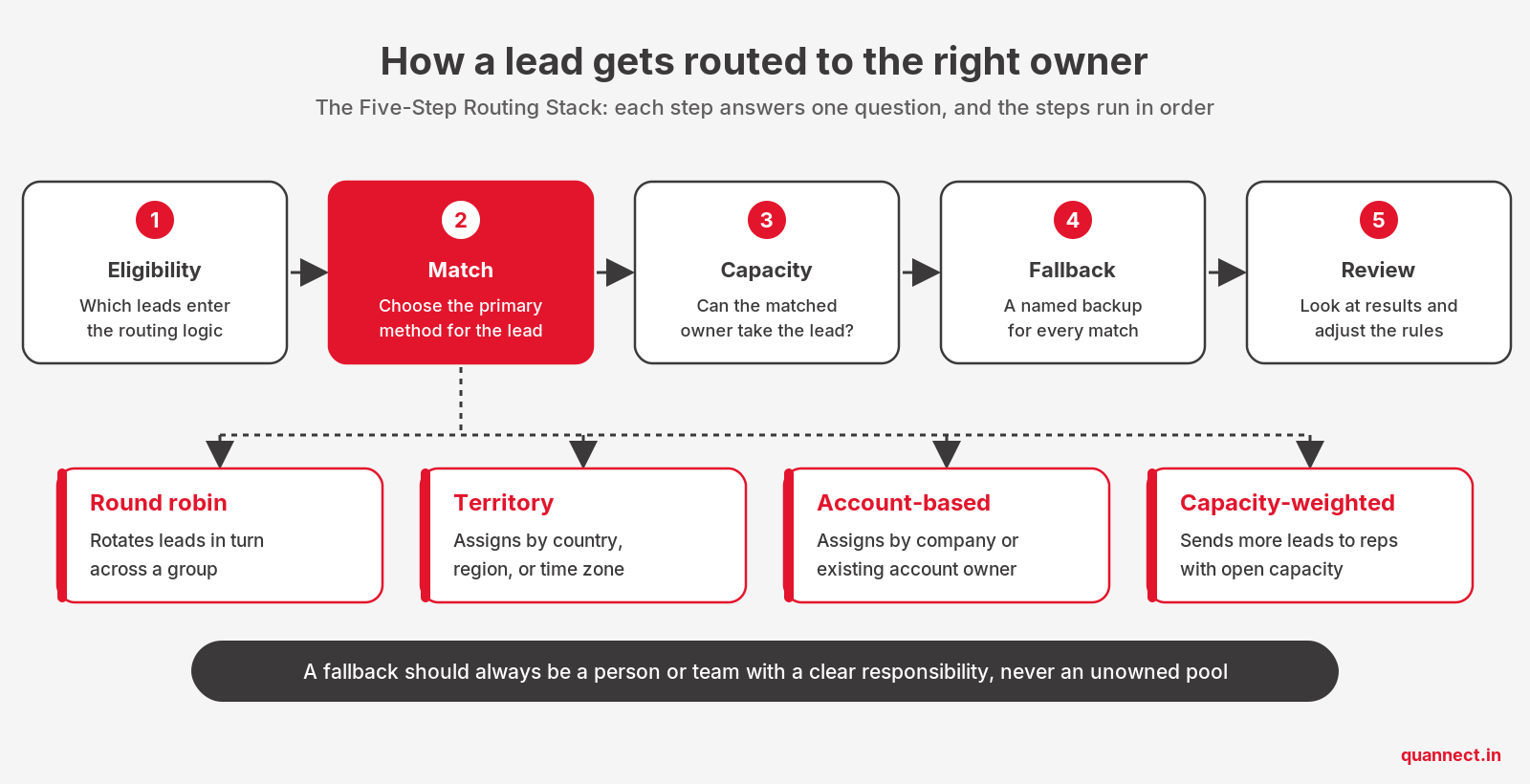
Territory routing assigns by geography. It suits teams where local language, legal requirements, or working hours matter. Account-based routing goes further and assigns by company. A lead from an account with an owner goes to that owner. Capacity-weighted routing checks how much each rep can take on right now. It works best alongside one of the other methods rather than on its own.
How do you build a routing framework that holds up?
Routing rules become messy when they are added one at a time. We use a simple structure to keep them coherent, which we call the Five-Step Routing Stack. Each step answers one question, and the steps run in order.
Step 1: Eligibility
Decide which leads enter the routing logic at all. Spam, duplicates, existing customers, and records missing a usable contact method should be handled before they reach a rep. An ineligible lead should go to a clearly labelled holding queue, not sit in the default inbox.
Step 2: Match
Choose the primary method for the lead, such as territory, account owner, or segment playbook. Keep the number of match rules small. When two rules could apply, write down which one wins. Most routing confusion comes from overlapping rules that nobody ranked. If you score leads, the score can decide which path a lead takes here; our guide to lead scoring models for paid leads covers how to build one.
Step 3: Capacity
Before assigning, check whether the matched owner can take the lead. If they are out of office, at their limit, or on leave, the lead moves to the next step instead of waiting in their queue.
Step 4: Fallback
Define a named backup for every match. That might be a second rep in the same territory, a team lead, or a shared queue with a specific person who checks it at set times. A fallback should always be a person or team with a clear responsibility, never an unowned pool.
Step 5: Review
Look at routing results on a regular schedule and adjust the rules. This is where you catch leads that bounce between owners or segments that never get assigned.
What does a routing rule checklist look like?
Work through this list before switching on any new assignment rule.
- Have you written down the single purpose of each rule in one sentence?
- Does every rule have a named owner who can change it?
- Is the order of rules documented, so you know which one wins when two match?
- Does each match have a fallback that is a person or team, not an empty queue?
- Do you check rep availability, such as out-of-office status, before assigning?
- Are duplicate and existing-customer records handled before routing runs?
- Can you see which rule assigned each lead, so you can explain the decision later?
- Have you tested the rules with sample records from each lead source?
- Is there a scheduled review date, and is someone responsible for running it?
How should you route leads across time zones and territories?
Teams selling across the US, the UK, Europe, Australia, and New Zealand often find that a lead arrives when the nearest rep is offline. Territory rules help, but they need one extra layer: a rule about hours. You can assign by region first, then route to a rep who is inside a working window when the primary owner is not. That keeps ownership local while making sure every lead has an available owner.
Language and regulation also shape routing. A lead from a market with different data rules may need to go to someone trained on those requirements, even if that person is not the closest by geography. Write these exceptions down.
How quickly an owner responds is a separate topic, covered in our guide to speed to lead.
How do you set up assignment rules in Salesforce, HubSpot, or Zoho CRM?
Each CRM handles assignment differently, so check the vendor’s current docs before you build. In Salesforce, lead assignment rules are set up in Setup. Only one rule can be active at a time, and its entries are checked in order, so the first matching entry decides the owner or queue. There is no built-in round robin. Put specific entries first and a catch-all last. In Zoho CRM, assignment rules sit under Setup, Automation, Assignment. Selecting several users assigns records in round robin order, and you can check whether a rep is online or on shift, with a default owner as the fallback. Rules apply to leads from web forms, imports and the API, not records created by hand. In HubSpot, owner rotation uses the Rotate record to owner workflow action, which needs Sales Hub or Service Hub Professional or Enterprise. Only reps with paid Sales or Service seats can be in the rotation.
Whichever tool you use, build the rules on a small segment first. Watch a few test leads move from eligibility to fallback before going live.
What should you measure to know routing is working?
Routing is working when leads have a clear owner, get worked by that owner, and move through your pipeline in a way you can explain. Start by tracking how many leads remain unassigned after the routing step, how many change owner after the first assignment, and how often the fallback is used. Frequent fallbacks usually point to an overloaded primary owner or a rule that does not match the leads it receives.
Then look at outcomes. Compare how leads perform by owner and by rule, using the stages your CRM already tracks. If leads stall after one routing path, review the rule before the rep. If you send qualified-stage outcomes back to ad platforms, the definition of that stage needs to match your routing logic. Our page on offline conversions explains how that feedback loop is structured.
Routing gaps are one place where leads can drop out of the funnel, and our post on lead leakage looks at the wider picture.
Frequently asked questions
What is the difference between lead routing and lead assignment?
The two terms overlap in everyday use. Lead routing describes the whole decision path, including eligibility, matching, capacity, and fallback. Lead assignment is the final step, where a specific owner is set on the record.
Is round robin enough for a small team?
It can be, if your reps have similar skills and cover similar markets. Once you notice leads from a specific industry or country going to someone without the right context, add a territory or account rule above the round robin. Round robin then becomes the default for everything else.
What should happen to a lead when nobody is available?
It should go to a named fallback owner, such as a team lead or a shared queue with a person who checks it at set times. Avoid leaving leads unassigned, because an unowned lead is the easiest one to lose track of.
Can I route leads from paid ads differently?
Yes. Many teams use the source campaign or offer as a routing input, so leads from a specific offer go to the rep who sells that offer. Check how your CRM and ad platform pass source fields before you depend on them, and confirm the details against the current docs for each tool.
How often should routing rules be reviewed?
Review them on a fixed schedule, such as monthly for an active team, and whenever you add a rep, enter a new market, or change your offer.
Do I need a specialist tool for lead routing?
Not always. Many CRMs handle the basic methods natively. Dedicated tools help when rules span several systems, but run the checklist above before buying anything.
Find out where your routing is leaking
If leads sit in shared inboxes or forgotten rules, a short review shows where ownership breaks.