Paid campaigns can fill a CRM quickly. A Google Search lead asking about pricing and a Meta lead who downloaded a checklist may look alike in a spreadsheet, yet rarely deserve the same first call. Lead scoring makes that difference visible before a rep picks up the phone. At Quannect, we see the same problem with B2B teams in the US, UK, Europe, Australia and New Zealand: the CRM holds plenty of leads, but nobody is sure who to call first.
Lead scoring assigns a value to each lead based on how well it fits your ideal customer and how actively it shows buying intent. For paid leads from Google, Meta, YouTube and LinkedIn, the most reliable setup combines fit, intent and paid-source signals inside your CRM, then checks those scores against which leads became real opportunities.
What is lead scoring?
Lead scoring is a method of giving each lead a numeric value based on rules you define. Points are added or subtracted when a lead matches a condition, such as job title, company size, country, pages viewed, or whether they replied to an email. When the total crosses a threshold you set, the lead is flagged as ready for sales, or sent down a different path, such as a nurture sequence.
A score is only as good as the thinking behind the points. Points set once and never reviewed quietly drift away from what actually closes.
What lead scoring models exist?
Most teams use one of three approaches, or a mix.
Rule-based models are the most common starting point. You decide the points by hand: a senior title earns more than a junior one, a demo request earns more than a blog visit. They are easy to explain to a sales team and easy to change.
Predictive models estimate likelihood from your historical data, usually by comparing the traits of leads that were won with those that were lost. They can find patterns you would not think to write down, but they need a reasonable history of closed deals. Check the vendor’s current docs on what data each platform needs.
The third approach separates fit from engagement. Fit asks whether the lead matches the customer you want. Engagement asks whether the lead is acting. Keeping them apart matters: a curious student may click every email and never buy, while a quiet operations director at the right company may be exactly your buyer.
What does a lead scoring example look like for a paid-ads lead?
Imagine a marketing head at a 50-person software company in the UK. They click a LinkedIn ad, fill in a short form, visit your pricing page and reply to a follow-up email. Their company and role match your ideal customer. A simple scoring setup might look like this:
| Layer | Example condition | Example points |
|---|---|---|
| Fit | Job title in your target list | +15 |
| Fit | Company size and country you serve | +15 |
| Intent | Visited the pricing or demo page | +20 |
| Intent | Replied to a follow-up email | +10 |
| Paid source | Campaign already tested against real opportunities | +5 |
| Mismatch | Outside your service area or offering | -30 |
These points are illustrative starting values, not benchmarks. Adjust them once you see which leads become opportunities.
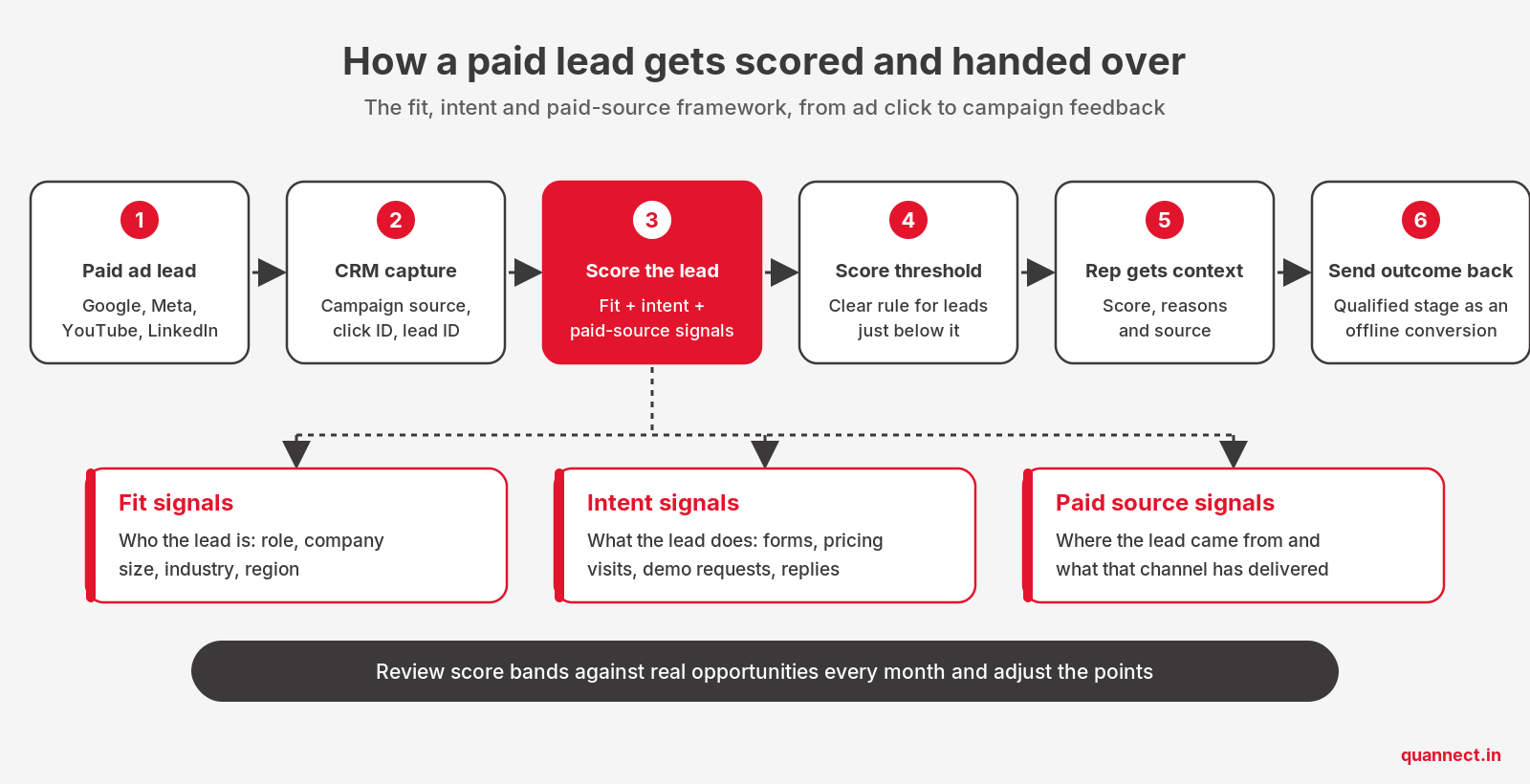
The total is not the point. The point is that the rep sees the score, the reasons behind it and the source, so they can open the conversation with something specific. A lead with a high fit score and low intent may need a light touch. A lead with high intent and weak fit may need a qualifying question before anyone books time.
How do you use the fit, intent and paid-source framework?
We use a simple three-layer framework when we help teams score paid leads. It is not a vendor standard, just a way of keeping the model honest.
- Fit signals describe who the lead is: role, seniority, company size, industry, region and any data you can verify about the account. These change slowly, so review them quarterly.
- Intent signals describe what the lead is doing: form completions, pricing page visits, demo requests, replies and meeting bookings. These change quickly, so they should decay over time if a lead goes quiet.
- Paid-source signals describe where the lead came from and what that channel has delivered. A Google Search lead asking a specific question and a YouTube viewer who watched a long video may warrant different starting points, but only if your own opportunity data supports that difference.
Keeping the three layers visible in the CRM makes the model easy to audit: when a high-scoring lead goes nowhere, you can see which layer misled you.
How do you set up lead scoring in HubSpot, Salesforce or Zoho CRM?
The process matters more than the platform. Before you configure anything, define a qualified lead, write down your fit criteria and agree the threshold where sales takes over. Then confirm what your plan supports in the docs for HubSpot or Zoho CRM, or Salesforce.
Treat this table as a starting point, not a buying guide.
| Area | HubSpot | Salesforce | Zoho CRM |
|---|---|---|---|
| Built-in scoring approach | A lead scoring tool that assigns points based on contact properties and behaviour | Predictive scoring with Einstein Lead Scoring, points scoring in Account Engagement, or rule-based scoring built with custom fields and flows | Scoring rules that assign points when record fields or conditions match |
| Best suited to | Teams already running marketing and sales in one platform | Teams with an established Salesforce admin and a defined lead process | Teams using the wider Zoho suite who want rule-based scoring without much extra tooling |
| Paid-lead fields | Map UTM and source properties to contacts so the score can reflect the campaign | Capture campaign source on the lead record and reference it in scoring logic | Store campaign source in a lead field and use it in a scoring rule |
| Things to verify | Lead scoring needs a Professional or Enterprise plan. Contact scores need Marketing Hub; AI-built scores need Marketing Hub Enterprise. | Einstein Lead Scoring is included in Performance and Unlimited editions and costs extra in Enterprise; Account Engagement scoring needs that product | Scoring rules start on Standard with limits; Enterprise and Ultimate allow multiple rules and more criteria. AI-based Zia Scores need Professional or above. |
In practice, the setup usually follows the same steps across all three. Create the score properties or fields, map the source data from your ad platforms and forms, write the rules for fit and intent, set a threshold for handover and build a view that shows the rep the score and the reasons behind it. Test with a small set of real leads before you switch the routing live. Once a lead crosses the threshold, the clock starts, so our speed to lead guide covers how quickly that first call should happen.
How do you know your scoring model works?
A scoring model is a hypothesis until it is tested against outcomes. Once a month, look at leads grouped by score band and ask three questions. Did the high-scoring leads become meetings and opportunities? Did any low-scoring leads convert anyway, and if so, what did they have in common? Which points are never triggered, or triggered by everyone?
Often the biggest improvement comes from removing points for signals that look busy but predict nothing, such as an action every lead takes when submitting a form. Keep a change log so you can see which edits helped.
A model that sends more leads to sales is not automatically better. The test is whether reps spend time on conversations that move forward.
What does a practical lead scoring checklist include?
- A written definition of a qualified lead, agreed by marketing and sales.
- A list of fit criteria, reviewed each quarter.
- Intent actions tied to specific pages, forms or replies, with points that decay when activity stops.
- Campaign source captured on every lead, including paid search, paid social, YouTube and LinkedIn.
- A handover threshold and a clear rule for what happens to leads just below it.
- A dashboard that shows score, reasons and source to the rep at the point of contact.
- A monthly review comparing score bands with opportunities created and won.
- A change log for every edit to the points, with the date and the reason.
Where do AI agents fit in lead scoring?
AI tools can help with the slow parts of scoring. They can summarise form answers, check a company against your fit criteria and draft a short note explaining why a lead scored as it did, which turns a number into something a rep can act on. Our post on AI agents in your CRM for speed to lead shows how this works once a scored lead reaches the rep.
Keep a human in the loop. An AI tool should not quietly change thresholds, rewrite fit criteria or disqualify a lead without a review path.
How do scores connect to your ad platforms?
Scoring becomes more valuable when it feeds back into your campaigns. If your CRM defines a qualified stage, for example a meeting held or an opportunity created, you may be able to send that outcome back to the ad platform as an offline conversion. Our offline conversions guide explains the general idea. In Google Ads, this is done with offline conversion import or enhanced conversions for leads. You turn on auto-tagging, capture the Google click ID (GCLID) when the lead arrives and store it with the lead, usually alongside a hashed email or phone number, then import the qualified stage as a conversion. You must accept Google’s customer data policies and pass consent status, which matters for users in the EEA and UK.
In Meta, use the Conversions API, which Meta now recommends for offline and CRM events, replacing its legacy Offline Conversions API. For Meta lead form leads, store the Meta lead ID in your CRM and send stage changes back with it; for website leads, send hashed email or phone. Send events soon after the stage changes, because Meta rejects events older than seven days.
Scoring also depends on follow-up. A high-scoring lead that sits untouched helps no one. Our lead leakage guide covers the common gaps between a lead arriving and a rep following up.
Frequently asked questions
What is the difference between lead scoring and lead qualification?
Lead scoring is an ongoing numeric measure that changes as the lead acts. Lead qualification is the decision that a lead meets your definition of a sales-ready conversation, which is often made by a person after a call. Scoring helps you decide who to call first, and qualification confirms whether the conversation should go further.
How many points should a lead need before sales takes it?
There is no universal number. Start with a threshold that gives your team a manageable number of handovers each week, then adjust it using your monthly review.
Can I use lead scoring if I only have a small number of paid leads?
Yes, but keep it simple. A rule-based model suits low volumes, because predictive models need a history of won and lost deals. Use a short list of fit criteria and two or three intent actions that clearly matter.
Should paid-ad leads be scored differently from organic or referral leads?
Sometimes. The source is a useful signal, but do not assume a channel is better or worse without your own opportunity data. Capture the source on every lead, review results by channel, and only then weight a channel.
Do I need AI to set up lead scoring?
No. Scoring works well with clear rules, accurate data and regular review. AI can help with summaries, but it should follow a process you have already designed.
How often should I update my scoring model?
Review intent and campaign signals monthly, and review fit criteria each quarter or whenever your ideal customer changes. Every change should go into your change log, so you can tell whether a new rule improved handovers or simply shifted the volume.
Want to see where your paid leads are leaking?
If your paid leads are scored but still reach sales late, the gap is often in the handover rather than the model.